
Imessage
Today we are going to talk about Apple’s text messaging service, called Imessage. To give the description of this feature, I give you Wiki’s definition: “iMessage allows users to send texts, documents, photos, videos, contact information, and group messages over Wi-Fi, 2G, 3G orLTE to other iOS or OSx users, thus providing an alternative to standard SMS/MMS messaging for most users with devices running iOS 5 or later.” So basically, it’s an alternative to a standard SMS/MMS message, for anybody using Apple. You can also think of this as like an IM client, such as AIM. It has the ability to send large document or pictures, without any compression, because it’s treated as a data transfer between both devices. If you have a non Apple device, you will be greeted with a message if your content is over limitation. That’s because it falls onto what your carrier allows you to send over wifi or LTE/4g/3g. Like, if I were to send a video to somebody who does not have an Apple device, my video will look choppy and unclear. That’s because it is being compressed, so it can send. On the other hand, if I try sending a long video to an Apple device using a non Apple device, I will get a message stating that I’m over the limit. Don’t worry I will pull out an Android phone of mine to show you what I mean. Screenshots always cleat up the air 😀 I can’t show what it will look like when an Apple device sends a video to a non Apple device though, but you’ll see what I mean by “limit reached.” Close enough,right? I will add that if you own an Android device, you can send video files, documents and such via Google Hangouts. It’s a third party application that can be used by both Android and iOS. So I guess that could service as a workaround for different platform devices.
This is what happens when a non Apple device tries sending long videos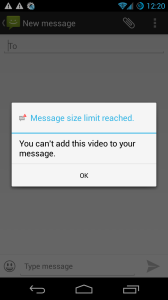
Last thing is to make sure Imessage is turned on.
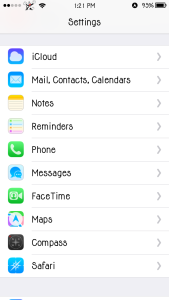
- Go into settings.
- scroll down to Messages.
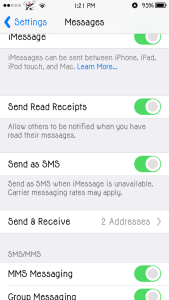
- Enable it and profit!
I suggest that you enable Send As SMS/MMS too. This is in case Apple’s servers have issues. That way, your friend/Family member or loved ones, get your text. You can also enable Read Receipts, which let’s you know when another iOS owner actually opens and reads your text. Then you can turn on Group message, to talk to more than one person at a time. Show Subject Field is great for sending long texts to non Apple devices. It basically converts it to an MMS, instead of the other person getting 10 texts in a row. How annoying, I must add. Character Count basically gives you the number of how many letters, number, symbols, etc that you have used in a text. Finally you have Blocked. If you have an annoying friend that you don’t want contacting you, add them to your block list. Problem solved! 😛 Well folks, that wraps up this article on what Imessage is all about. Hope you enjoyed and learned something new today.
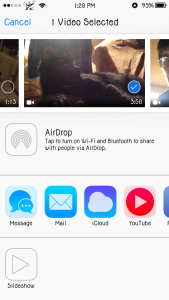
(As you can see in the third picture, sending a nearly 4 minute video is no problem via Imessage. It will be received just how it was recorded with no compression!)