How To Set Passcode

So you want to add more security to your Idevice. Many you have a nosy family member, or you just place your phone down at work, and never think about who can access your phone without you knowing! It’s a pretty scary thought when you think about it. Anybody can have access to all of your data, and you will become a victim of whatever that person has in store for you. We certainly don’t want that happening to any of our followers. So let’s go through a simple set of steps to lock your phone up, shall we? 🙂
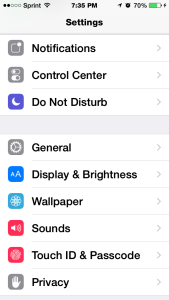
- Navigate to your settings app. It’s that gray gear looking icon.
- Scroll a bit down until you see TouchID/Passcode.
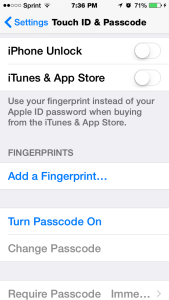
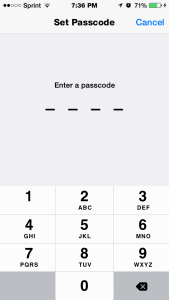
- Click Turn On Passcode. Now if you have an Iphone 5s, you can add a finger print, in order to unlock your device. If not, you can set a 4 digit code.
- Make your passcode, enter it once then again. This is to make sure it matches up with what you first put it.
It’s literally that simple! If you have the Iphone 5s, click on Add a Fingerprint, then follow the instructions. This way only YOUR finger can unlock your device. Neat, right? You can use your finger to unlock your phone and for Itunes/App store. Again, Apple is secure, so when you go to install an app, you have to give your Apple ID password. This is different from the passcode you made to unlock your device! BUT if you turn on TouchID, only then can you use your finger as a means to “act like” your password.
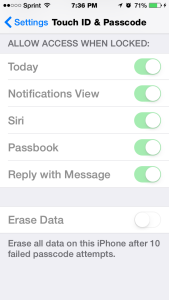
As a final note: There is an option to Erase All Data if your passcode is entered wrong after 10 tries. This can be a good thing if your phone gets stolen. Because nobody wants their data compromised. But if you are the forgetful type, this can be bad! Just think: all of your photos of your children will be gone. Important work documents, gone. So for now, let’s keep that off, just in case. The choice is ultimately yours though :]
Step1. Step 2. Step 3. Step 4.